
diff options
| author | sigoden <sigoden@gmail.com> | 2024-04-20 21:07:30 +0800 |
|---|---|---|
| committer | GitHub <noreply@github.com> | 2024-04-20 21:07:30 +0800 |
| commit | 8ab57ed74ea67d3f023aa0fcd695cb107b676501 (patch) | |
| tree | 3047e4efdc24f66b30a9df30058695b757e2c342 /README.md | |
| parent | 5d763fc10c4e3d40268ead473ccb0000b4923bd1 (diff) | |
| download | aichat-8ab57ed74ea67d3f023aa0fcd695cb107b676501.tar.gz | |
refactor: update description for cli options and config fields (#423)
Diffstat (limited to 'README.md')
| -rw-r--r-- | README.md | 276 |
1 files changed, 117 insertions, 159 deletions
@@ -1,38 +1,32 @@ -# AIChat +# Aichat: All-in-one AI-Powered CLI Chat & Copilot [](https://github.com/sigoden/aichat/actions/workflows/ci.yaml) [](https://crates.io/crates/aichat) [](https://discord.gg/dSHTvH6S) -All-in-one chat and copilot CLI that integrates 10+ AI platforms. - -Command Mode: +Aichat is a AI-powered CLI chat and copilot tool that seamlessly integrates with over 10 leading AI platforms, providing a powerful combination of chat-based interaction, context-aware conversations, and AI-assisted shell capabilities, all within a customizable and user-friendly environment. 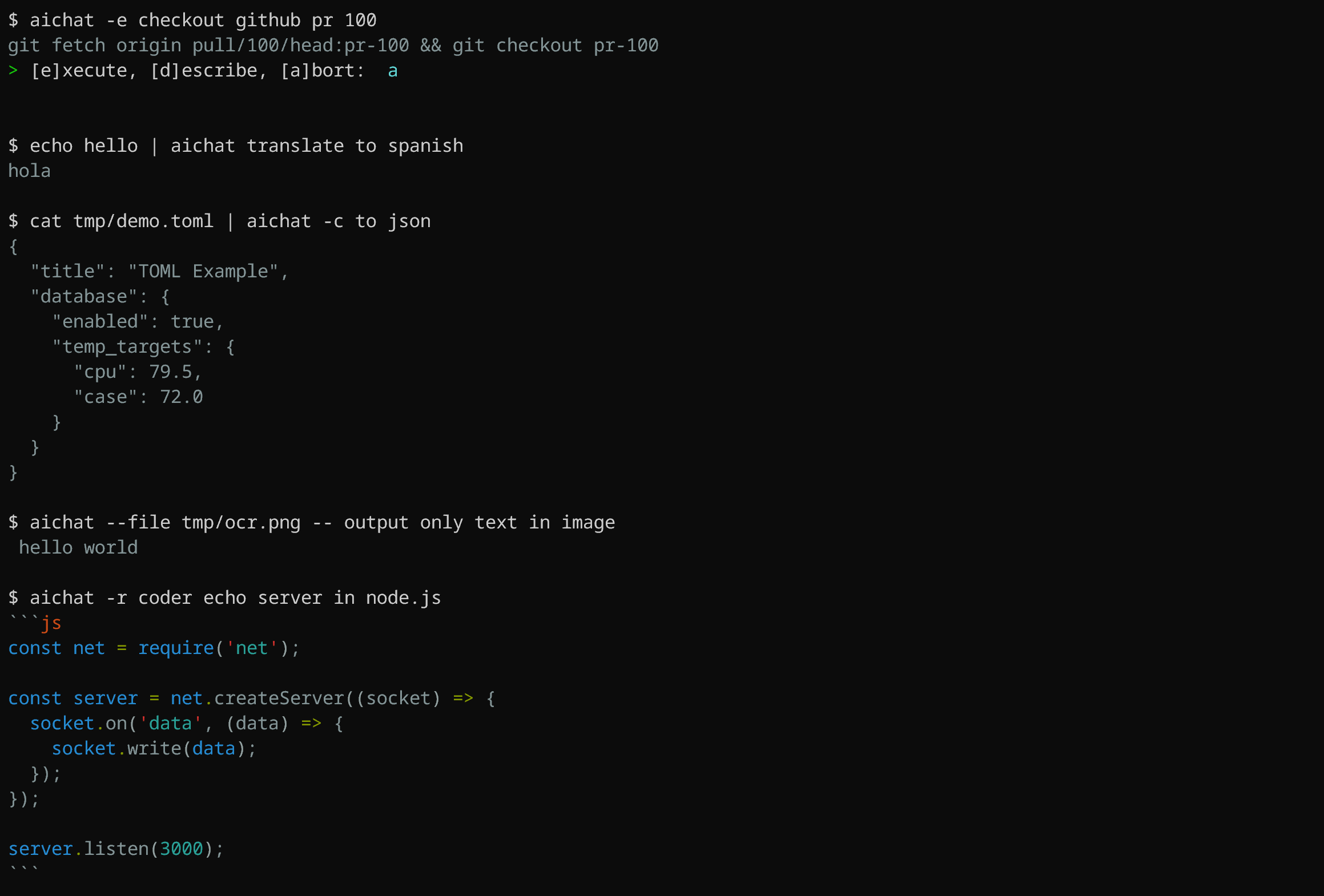 -Chat REPL mode: -  -## Features +## Key Features -- Supports [chat-REPL](#chat-repl) -- Supports [roles](#roles) -- Supports sessions (context-aware conversation) -- Supports image analysis (vision) -- [Shell commands](#shell-commands): Execute commands using natural language -- [Shell integration](#shell-integration): AI-powered shell autocompletion -- [Custom theme](https://github.com/sigoden/aichat/wiki/Custom-Theme) -- Stream/non-stream output +* **Converse with Advanced AI:** Access and interact with 10+ leading AI platforms including OpenAI, Claude, Gemini, and more, all within one interface. +* **Streamline Your Workflow:** Generate code, execute shell commands using natural language, and automate tasks with AI assistance. +* **Unleash Your Creativity:** Utilize AI for writing, translation, image analysis, and exploring new ideas. +* **Customize Your Experience:** Configure settings, create custom roles for AI, and personalize your chat interface. +* **Empower Your Terminal:** Integrate AI into your shell for intelligent autocompletion and command suggestions. +* **Context & Session Management:** Maintain context within conversations and manage multiple sessions effortlessly. -## Integrated platforms +## Supported AI Platforms -- OpenAI: GPT3.5/GPT4 (paid, vision) -- Azure-OpenAI (paid) +- OpenAI GPT-3.5/GPT-4 (paid, vision) +- Azure OpenAI (paid) - OpenAI-Compatible platforms - Gemini: Gemini-1.0/Gemini-1.5 (free, vision) - VertexAI (paid, vision) -- Claude: Claude3 (vision, paid) +- Claude: Claude-3 (vision, paid) - Mistral (paid) - Cohere (paid) - Ollama (free, local) @@ -41,57 +35,52 @@ Chat REPL mode: ## Install -### Use a package management tool +### Package Managers -For Rust programmer -```sh -cargo install aichat -``` +- **Rust Developers:** `cargo install aichat` +- **Homebrew/Linuxbrew Users:** `brew install aichat` +- **Pacman Users**: `yay -S aichat` +- **Windows Scoop Users:** `scoop install aichat` +- **Android Termux Users:** `pkg install aichat` -For macOS Homebrew or a Linuxbrew user -```sh -brew install aichat -``` +### Pre-built Binaries -For Windows Scoop user -```sh -scoop install aichat -``` - -For Android Termux user -```sh -pkg install aichat -``` +Download pre-built binaries for macOS, Linux, and Windows from [GitHub Releases](https://github.com/sigoden/aichat/releases), extract them, and add the `aichat` binary to your `$PATH`. -### Binaries for macOS, Linux, and Windows +## Configuration -Download it from [GitHub Releases](https://github.com/sigoden/aichat/releases), unzip, and add aichat to your `$PATH`. - -## Config - -On first launch, aichat will guide you through the configuration. +Upon first launch, Aichat will guide you through the configuration process. An example configuration file is provided below: ``` > No config file, create a new one? Yes > AI Platform: openai > API Key: <your_api_key_here> +✨ Saved config file to <config-dir>/aichat/config.yaml ``` Feel free to adjust the configuration according to your needs. +> Get `config.yaml` path with command `aichat --info` or repl command `.info`. + ```yaml -model: openai:gpt-3.5-turbo # LLM model -temperature: 1.0 # LLM temperature -save: true # Whether to save the message -save_session: null # Whether to save the session, if null, asking -highlight: true # Set false to turn highlight -light_theme: false # Whether to use a light theme -wrap: no # Specify the text-wrapping mode (no, auto, <max-width>) -wrap_code: false # Whether wrap code block -auto_copy: false # Automatically copy the last output to the clipboard -keybindings: emacs # REPL keybindings. values: emacs, vi -prelude: '' # Set a default role or session (role:<name>, session:<name>) -compress_threshold: 1000 # Compress session if tokens exceed this value (valid when >=1000) +model: openai:gpt-3.5-turbo # The Large Language Model (LLM) to use +temperature: 1.0 # Controls the randomness and creativity of the LLM's responses +save: true # Indicates whether to persist the message +save_session: null # Controls the persistence of the session, if null, asking the user +highlight: true # Controls syntax highlighting +light_theme: false # Activates a light color theme when true +wrap: no # Controls text wrapping (no, auto, <max-width>) +wrap_code: false # Enables or disables wrapping of code blocks +auto_copy: false # Enables or disables automatic copying the last LLM response to the clipboard +keybindings: emacs # Choose keybinding style (emacs, vi) +prelude: null # Set a default role or session to start with (role:<name>, session:<name>) + +# Command that will be used to edit the current line buffer with ctrl+o +# if unset fallback to $EDITOR and $VISUAL +buffer_editor: null + +# Compress session when token count reaches or exceeds this threshold (must be at least 1000) +compress_threshold: 1000 clients: - type: openai @@ -101,15 +90,13 @@ clients: name: localai api_base: http://127.0.0.1:8080/v1 models: - - name: llama2 + - name: llama3 max_input_tokens: 8192 ``` -Please review the [config.example.yaml](config.example.yaml) to see all available configuration options. +Refer to the [config.example.yaml](config.example.yaml) file for a complete list of configuration options. Environment variables can also be used for configuration; see the [Environment Variables](https://github.com/sigoden/aichat/wiki/Environment-Variables) page for details. -There are some configurations that can be set through environment variables, see [Environment Variables](https://github.com/sigoden/aichat/wiki/Environment-Variables). - -## Command +## Command line ``` Usage: aichat [OPTIONS] [TEXT]... @@ -118,18 +105,19 @@ Arguments: [TEXT]... Input text Options: - -m, --model <MODEL> Choose a LLM model - -r, --role <ROLE> Choose a role - -s, --session [<SESSION>] Create or reuse a session - -e, --execute Execute commands using natural language - -c, --code Generate only code - -f, --file <FILE> Attach files to the message - -H, --no-highlight Disable syntax highlighting - -S, --no-stream No stream output - -w, --wrap <WRAP> Specify the text-wrapping mode (no, auto, <max-width>) + -m, --model <MODEL> Select a LLM model + -r, --role <ROLE> Select a role + -s, --session [<SESSION>] Start or join a session + --save-session Forces the session to be saved + -e, --execute Execute commands in natural language + -c, --code Output code only + -f, --file <FILE> Include files with the message + -H, --no-highlight Turn off syntax highlighting + -S, --no-stream Turns off stream mode + -w, --wrap <WRAP> Control text wrapping (no, auto, <max-width>) --light-theme Use light theme - --dry-run Run in dry run mode - --info Print related information + --dry-run Display the message without sending it + --info Dispaly information --list-models List all available models --list-roles List all available roles --list-sessions List all available sessions @@ -140,7 +128,7 @@ Options: Here are some practical examples: ```sh -aichat # Start in REPL mode +aichat # Start REPL aichat -e install nvim # Execute aichat -c fibonacci in js # Code @@ -148,9 +136,9 @@ aichat -c fibonacci in js # Code aichat -s # REPL + New session aichat -s session1 # REPL + New/Reuse 'session1' -aichat --info # System info -aichat -r role1 --info # Role info -aichat -s session1 --info # Session info +aichat --info # View system info +aichat -r role1 --info # View role info +aichat -s session1 --info # View session info cat data.toml | aichat -c to json > data.json # Pipe stdio/stdout @@ -167,32 +155,19 @@ Simply input what you want to do in natural language, and aichat will prompt and aichat -e <text>... ``` -Aichat is aware of OS and `$SHELL` you are using, it will provide shell command for specific system you have. For instance, if you ask `aichat` to update your system, it will return a command based on your OS. Here's an example using macOS: +Aichat is aware of OS and shell you are using, it will provide shell command for specific system you have. For instance, if you ask `aichat` to update your system, it will return a command based on your OS. Here's an example using macOS: -```sh -aichat -e update my system +``` +$ aichat -e update my system # sudo softwareupdate -i -a -# ? [e]xecute, [d]escribe, [a]bort: (e) +? [1]:execute [2]:explain [3]:revise [4]:cancel (1) ``` The same prompt, when used on Ubuntu, will generate a different suggestion: -```sh - aichat -e update my system -# sudo apt update && sudo apt upgrade -y -# ? [e]xecute, [d]escribe, [a]bort: (e) -``` - -We can still use pipes to pass input to aichat and generate shell commands: - -```sh -aichat -e POST localhost with < data.json -# curl -X POST -H "Content-Type: application/json" -d '{"a": 1, "b": 2}' localhost -# ? [e]xecute, [d]escribe, [a]bort: (e) ``` - -We can also pipe the output of aichat which will disable interactive mode. -```sh -aichat -e find all json files in current folder | pbcopy +$ aichat -e update my system +sudo apt update && sudo apt upgrade -y +? [1]:execute [2]:explain [3]:revise [4]:cancel (1) ``` ### Shell integration @@ -205,35 +180,9 @@ To install shell integration, go to [./scripts/shell-integration](https://github ### Generating code -By using the `--code` or `-c` parameter, you can specifically request pure code output, for instance: - -``` -aichat --code a echo server in node.js -``` +By using the `--code` or `-c` parameter, you can specifically request pure code output. -```js -const net = require('net'); - -const server = net.createServer(socket => { - socket.on('data', data => { - socket.write(data); - }); - - socket.on('end', () => { - console.log('Client disconnected'); - }); -}); - -server.listen(3000, () => { - console.log('Server running on port 3000'); -}); -``` - -Since it is valid js code, we can redirect the output to a file: -``` -aichat --code a echo server in node.js > echo-server.js -node echo-server.js -``` + **The `-c/--code` option ensures the extraction of code from Markdown.** @@ -241,40 +190,38 @@ node echo-server.js Aichat has a powerful Chat REPL. -The REPL supports: - -- Tab autocompletion -- [Custom REPL Prompt](https://github.com/sigoden/aichat/wiki/Custom-REPL-Prompt) -- Emacs/Vi keybinding -- Edit/paste multi-line text -- Open an editor to modify the current prompt -- History -- Undo support +**REPL Features:** +- **Convenient Tab Autocompletion:** Get suggestions for commands and functions while typing. +- **Customizable REPL Prompt:** Personalize the REPL interface by defining your own prompt. +- **Streamlined Keybindings:** Use familiar Emacs/Vi keybindings for efficient navigation and editing. +- **Multi-line Editing:** Create and edit multi-line inputs with ease. +- **External Editor Integration:** Open an external editor to refine the current inputs or write longer inputs. +- **History and Undo Support:** Access previously executed commands and undo any actions you make. ### `.help` - print help message ``` > .help -.help Print this help message -.info Print system info -.model Switch LLM model -.role Use a role -.info role Show the role info -.exit role Leave current role -.session Start a context-aware chat session -.info session Show the session info -.save session Save the session to the file -.clear messages Clear messages in the session +.help Show this help message +.info View system info +.model Change the current LLM +.prompt Make a temporary role using a prompt +.role Switch to a specific role +.info role View role info +.exit role Leave the role +.session Begin a chat session +.info session View session info +.save session Save the chat to file +.clear messages Erase messages in the current session .exit session End the current session -.file Attach files to the message and then submit it -.set Modify the configuration parameters -.copy Copy the last reply to the clipboard +.file Read files and send them as input +.set Adjust settings +.copy Copy the last response .exit Exit the REPL -Type ::: to begin multi-line editing, type ::: to end it. -Press Ctrl+O to open an editor to modify the current prompt. -Press Ctrl+C to abort readline, Ctrl+D to exit the REPL - +Type ::: to start multi-line editing, type ::: to finish it. +Press Ctrl+O to open an editor to edit line input. +Press Ctrl+C to cancel the response, Ctrl+D to exit the REPL ``` ### `.info` - view information @@ -285,19 +232,19 @@ model openai:gpt-3.5-turbo temperature - dry_run false save true -save_session true +save_session - highlight true light_theme false wrap no wrap_code false -auto_copy false +auto_copy true keybindings emacs prelude - -compress_threshold 1000 -config_file /home/alice/.config/aichat/config.yaml -roles_file /home/alice/.config/aichat/roles.yaml -messages_file /home/alice/.config/aichat/messages.md -sessions_dir /home/alice/.config/aichat/sessions +compress_threshold 2000 +config_file /home/sigo/.config/aichat/config.yaml +roles_file /home/sigo/.config/aichat/roles.yaml +messages_file /home/sigo/.config/aichat/messages.md +sessions_dir /home/sigo/.config/aichat/sessions ``` ### `.model` - choose a model @@ -307,7 +254,7 @@ sessions_dir /home/alice/.config/aichat/sessions > .model ollama:llama2 ``` -> You can easily enter model name using autocomplete. +> You can easily enter model name using tab autocompletion. ### `.role` - let the AI play a role @@ -377,7 +324,18 @@ The prompt on the right side is about the current usage of tokens and the propor compared to the maximum number of tokens allowed by the model. -### `.file` - attach files to the message +### `.prompt` - make a temporary role using a prompt + +There are situations where setting a system message is necessary, but modifying the `roles.yaml` file is undesirable. +To address this, we leverage the `.prompt` to create a temporary role specifically for this purpose. + +``` +> .prompt write unit tests for the rust functions + +%%> +``` + +### `.file` - include files with the message ``` Usage: .file <file>... [-- text...] @@ -406,7 +364,7 @@ Usage: .file <file>... [-- text...] We can define a batch of roles in `roles.yaml`. -> Retrieve the location of `roles.yaml` through the REPL `.info` command or CLI `--info` option. +> Get `roles.yaml` path with command `aichat --info` or repl command `.info`. For example, we can define a role: |