
diff options
| -rw-r--r-- | Cargo.toml | 2 | ||||
| -rw-r--r-- | README.md | 267 |
2 files changed, 147 insertions, 122 deletions
@@ -3,7 +3,7 @@ name = "aichat" version = "0.13.0" edition = "2021" authors = ["sigoden <sigoden@gmail.com>"] -description = "Use GPT-4(V), Gemini, LocalAI, Ollama and other LLMs in the terminal." +description = "All in one CLI tool for 10+ AI." license = "MIT OR Apache-2.0" homepage = "https://github.com/sigoden/aichat" repository = "https://github.com/sigoden/aichat" @@ -3,15 +3,15 @@ [](https://github.com/sigoden/aichat/actions/workflows/ci.yaml) [](https://crates.io/crates/aichat) -Use GPT-4(V), Gemini, LocalAI, Ollama and other LLMs in the terminal. +All in one CLI tool for 10+ AI, supports OpenAI, Gemini, Claude, Mistral, LocalAI, Ollama, VertexAI, Ernie, Qianwen... -AIChat in chat REPL mode: +Command Mode: - +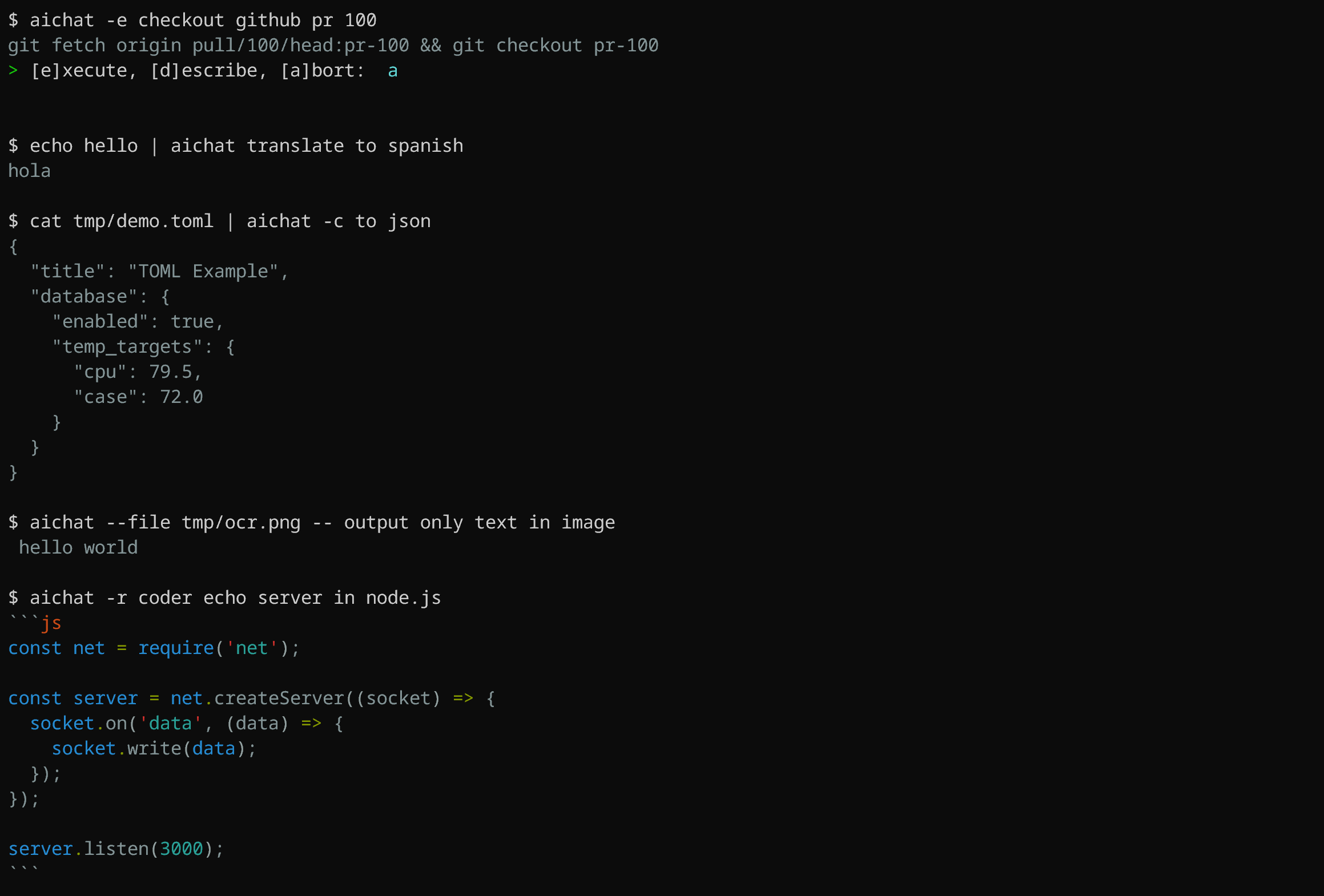 -AIChat in command mode: +Chat REPL mode: - + ## Install @@ -43,21 +43,22 @@ Download it from [GitHub Releases](https://github.com/sigoden/aichat/releases), ## Features - Support most of the LLM platforms - - OpenAI (paid, vision) + - OpenAI: GPT3.5/GPT4 (paid, vision) - Gemini (free, vision) - - Claude (paid) + - Claude: Claude2/Claude3 (paid) - Mistral (paid) - LocalAI (free, local, vision) - Ollama (free, local) - Azure-OpenAI (paid) - - VertexAI (paid, vision) + - VertexAI: Gemini (paid, vision) - Ernie (paid) - Qianwen (paid, vision) -- Support [REPL Mode](#chat-repl) and [Command Mode](#command) -- Support [Roles](#roles) -- Support context-aware conversation (session) +- Support [Command Mode](#command) and [Chat-REPL Mode](#chat-repl) +- Support [roles](#roles) +- Support sessions (context-aware conversation) - Support multimodal models (vision) - Execute commands using natural language +- Shell integration - Syntax highlighting for markdown and 200+ languages in code blocks - Save messages/sessions - Stream/Non-stream output @@ -104,52 +105,139 @@ Take a look at the [config.example.yaml](config.example.yaml) for the complete c There are some configurations that can be set through environment variables. For more information, please refer to the [Environment Variables](https://github.com/sigoden/aichat/wiki/Environment-Variables) page. -### Roles +## Command -We can define a batch of roles in `roles.yaml`. +``` +Usage: aichat [OPTIONS] [TEXT]... -> We can get the location of `roles.yaml` through the repl's `.info` command or cli's `--info` option. +Arguments: + [TEXT]... Input text -For example, we can define a role: +Options: + -m, --model <MODEL> Choose a LLM model + -r, --role <ROLE> Choose a role + -s, --session [<SESSION>] Create or reuse a session + -e, --execute Execute commands using natural language + -c, --code Generate only code + -f, --file <FILE>... Attach files to the message to be sent + -H, --no-highlight Disable syntax highlighting + -S, --no-stream No stream output + -w, --wrap <WRAP> Specify the text-wrapping mode (no, auto, <max-width>) + --light-theme Use light theme + --dry-run Run in dry run mode + --info Print related information + --list-models List all available models + --list-roles List all available roles + --list-sessions List all available sessions + -h, --help Print help + -V, --version Print version +``` -```yaml -- name: shell - prompt: > - I want you to act as a Linux shell expert. - I want you to answer only with bash code. - Do not provide explanations. +Here are some practical examples: + +```sh +aichat # Start in REPL mode + +aichat -e install nvim # Execute +aichat -c fibonacci in js # Code + +aichat -s # REPL + New session +aichat -s sess1 # REPL + New/Reuse test session + +aichat --info # System info +aichat -s sess1 --info # Session info +aichat -r role1 --info # Role info + +cat data.toml | aichat -c to json > data.json # Pipe IO + +aichat --file a.png b.png -- diff images # Attach files ``` -Let ChatGPT answer questions in the role of a Linux shell expert. +### Execute commands using natural language + +Simply input what you want to do in natural language, and aichat will prompt and run the command that achieves your intent. ``` -> .role shell +aichat -s <text>... +``` -shell> extract encrypted zipfile app.zip to /tmp/app -mkdir /tmp/app -unzip -P PASSWORD app.zip -d /tmp/app +Aichat is aware of OS and `$SHELL` you are using, it will provide shell command for specific system you have. For instance, if you ask `aichat` to update your system, it will return a command based on your OS. Here's an example using macOS: + +```sh +aichat -e update my system +# sudo softwareupdate -i -a +# ? [e]xecute, [d]escribe, [a]bort: (e) ``` -AIChat with roles will be a universal tool. +The same prompt, when used on Ubuntu, will generate a different suggestion: +```sh + aichat -e update my system +# sudo apt update && sudo apt upgrade -y +# ? [e]xecute, [d]escribe, [a]bort: (e) +``` + +We can still use pipes to pass input to aichat and generate shell commands: + +```sh +aichat -e POST localhost with < data.json +# curl -X POST -H "Content-Type: application/json" -d '{"a": 1, "b": 2}' localhost +# ? [e]xecute, [d]escribe, [a]bort: (e) +``` +We can also pipe the output of aichat which will disable interactive mode. +```sh +aichat -e find all json files in current folder | pbcopy ``` -$ aichat --role shell extract encrypted zipfile app.zip to /tmp/app -unzip -P password app.zip -d /tmp/app -$ cat README.md | aichat --role spellcheck +### Shell integration + +This is a **very handy feature**, which allows you to use `aichat` shell completions directly in your terminal, without the need to type `aichat` with prompt and arguments. This feature puts `aichat` completions directly into terminal buffer (input line), allowing for immediate editing of suggested commands. + +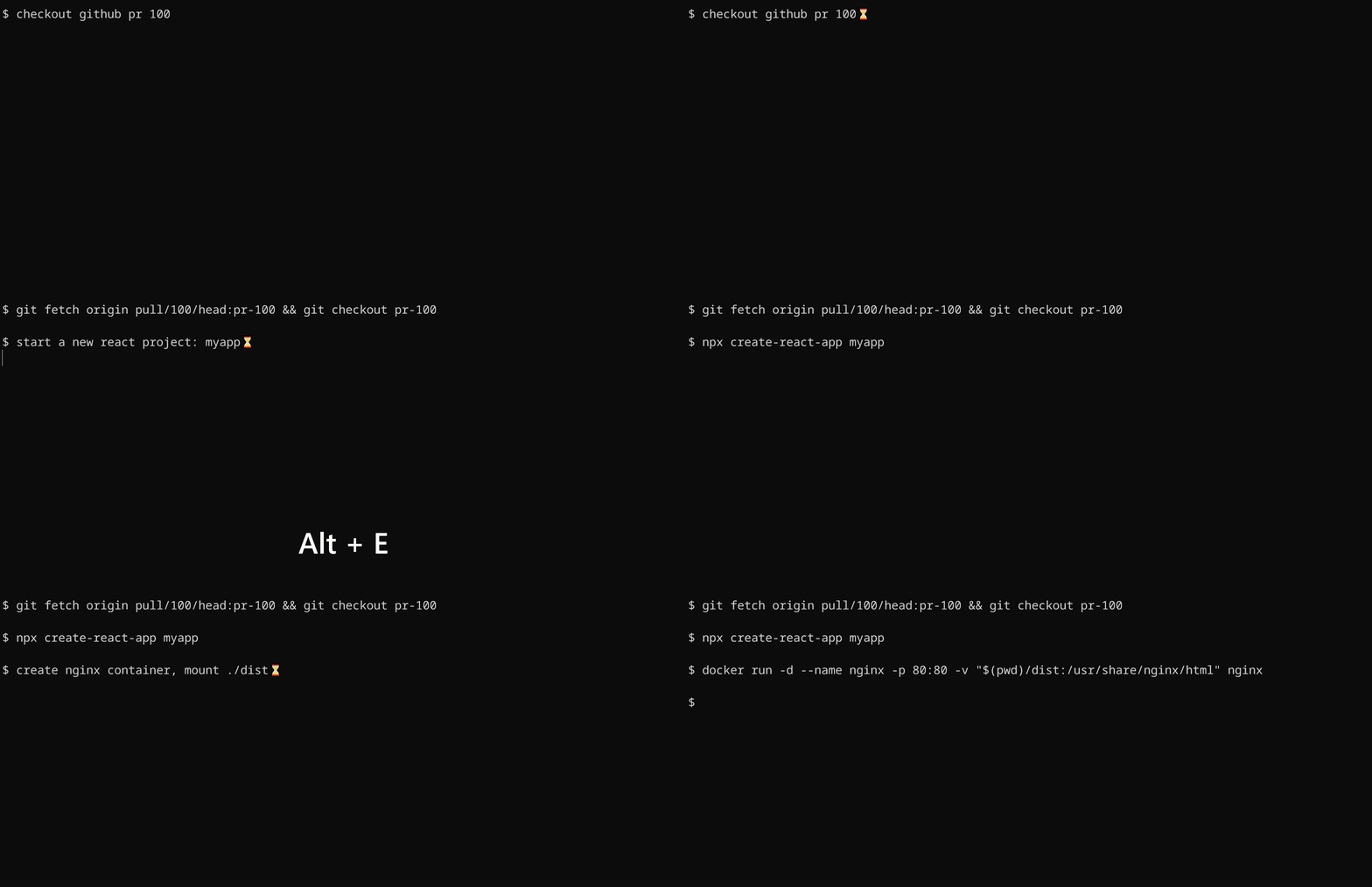 + +To install shell integration, go to [./scripts/shell-integration](https://github.com/sigoden/aichat/tree/main/scripts/shell-integration) to download the script and source the script in rc file. After that restart your shell. You can invoke the completion with `alt+e` hotkey. + +## Generate Code + +By using the `--code` or `-c` parameter, you can specifically request pure code output, for instance: + +``` +aichat --code a echo server in node.js ``` -For more details about roles, please visit [Role Guide](https://github.com/sigoden/aichat/wiki/Role-Guide). +```js +const net = require('net'); + +const server = net.createServer(socket => { + socket.on('data', data => { + socket.write(data); + }); + + socket.on('end', () => { + console.log('Client disconnected'); + }); +}); + +server.listen(3000, () => { + console.log('Server running on port 3000'); +}); +``` + +Since it is valid js code, we can redirect the output to a file: +``` +aichat --code a echo server in node.js > echo-server.js +node echo-server.js +``` ## Chat REPL aichat has a powerful Chat REPL. -The Chat REPL supports: +The REPL supports: -- Emacs/Vi keybinding -- [Custom REPL Prompt](https://github.com/sigoden/aichat/wiki/Custom-REPL-Prompt) - Tab autocomplete +- [Custom REPL Prompt](https://github.com/sigoden/aichat/wiki/Custom-REPL-Prompt) +- Emacs/Vi keybinding - Edit/paste multiline text - Open an editor to modify the current prompt - Undo support @@ -166,6 +254,7 @@ The Chat REPL supports: .exit role Leave current role .session Start a context-aware chat session .info session Show session info +.clear messages Clear messages in the session .exit session End the current session .file Attach files to the message and then submit it .set Modify the configuration parameters @@ -193,6 +282,7 @@ wrap_code false auto_copy false keybindings emacs prelude - +compress_threshold 1000 config_file /home/alice/.config/aichat/config.yaml roles_file /home/alice/.config/aichat/roles.yaml messages_file /home/alice/.config/aichat/messages.md @@ -203,7 +293,7 @@ sessions_dir /home/alice/.config/aichat/sessions ``` > .model openai:gpt-4 -> .model localai:gpt4all-j +> .model ollama:llama2 ``` > You can easily enter enter model name using autocomplete. @@ -293,114 +383,49 @@ Usage: .file <file>... [-- text...] ``` > .set temperature 1.2 +> .set compress_threshold 1000 > .set dry_run true > .set highlight false > .set save false > .set auto_copy true -> .set compress_threshold 1000 -``` - -## Command - -``` -Usage: aichat [OPTIONS] [TEXT]... - -Arguments: - [TEXT]... Input text - -Options: - -m, --model <MODEL> Choose a LLM model - -r, --role <ROLE> Choose a role - -s, --session [<SESSION>] Create or reuse a session - -e, --execute Execute commands using natural language - -c, --code Generate only code - -f, --file <FILE>... Attach files to the message to be sent - -H, --no-highlight Disable syntax highlighting - -S, --no-stream No stream output - -w, --wrap <WRAP> Specify the text-wrapping mode (no, auto, <max-width>) - --light-theme Use light theme - --dry-run Run in dry run mode - --info Print related information - --list-models List all available models - --list-roles List all available roles - --list-sessions List all available sessions - -h, --help Print help - -V, --version Print version ``` -Here are some practical examples: - -```sh -aichat -s # Start REPL with a new session -aichat -s temp # Reuse temp session -aichat -r shell -s # Create a session with a role -aichat -m openai:gpt-4-32k -s # Create a session with a model -aichat -s temp unzip a file # Run session in command mode - -aichat -r shell unzip a file # Use role in command mode -aichat -s shell unzip a file # Use session in command mode - -cat data.toml | aichat -c to json # Read stdin - -aichat --file a.png b.png -- diff images # Attach files -aichat --file screenshot.png -r ocr # Attach files with a role - -aichat --list-models # List all available models -aichat --list-roles # List all available roles -aichat --list-sessions # List all available models +### Roles -aichat --info # system-wide information -aichat -s temp --info # Show session details -aichat -r shell --info # Show role info +We can define a batch of roles in `roles.yaml`. -$(echo "$data" | aichat -c to json) # Use aichat in a script -``` +> Retrieve the location of `roles.yaml` through the REPL `.info` command or CLI `--info` option. -### Execute commands using natural language - -Simply input what you want to do in natural language, and aichat will prompt and run the command that achieves your intent. +For example, we can define a role: +```yaml +- name: shell + prompt: > + I want you to act as a Linux shell expert. + I want you to answer only with bash code. + Do not provide explanations. ``` -aichat -s <text>... -``` - -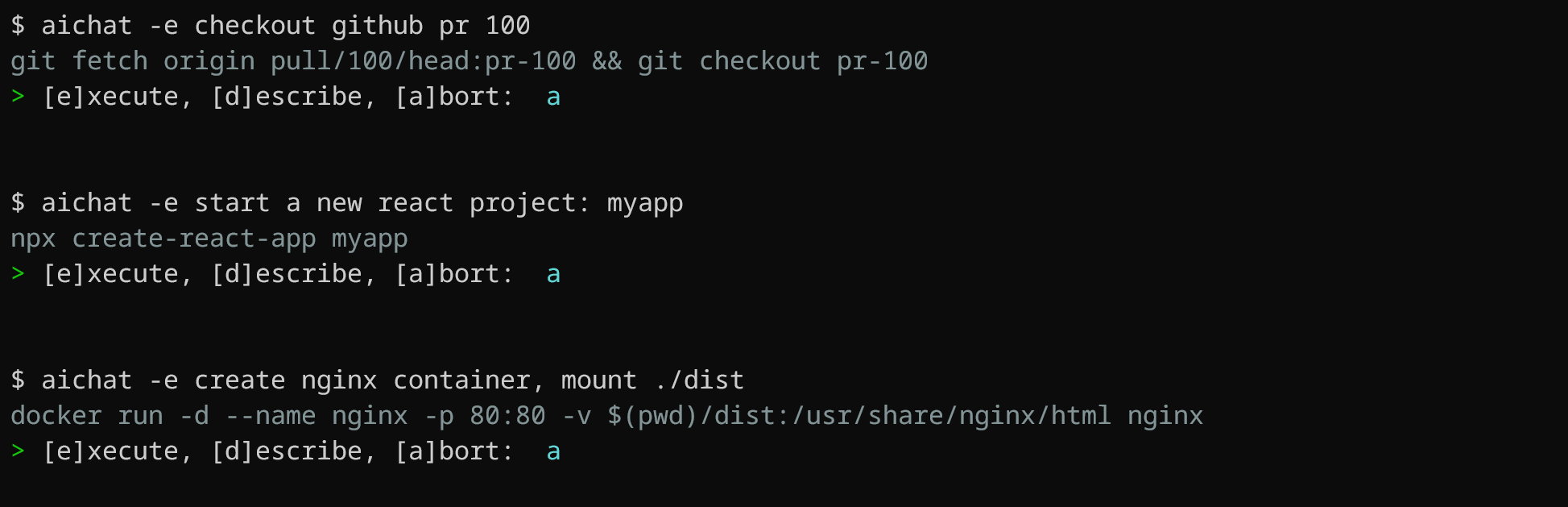 -Aichat is aware of OS and `$SHELL` you are using, it will provide shell command for specific system you have. For instance, if you ask `aichat` to update your system, it will return a command based on your OS. Here's an example using macOS: +Let ChatGPT answer questions in the role of a Linux shell expert. -```sh -aichat -e update my system -# sudo softwareupdate -i -a -# ? [e]xecute, [d]escribe, [a]bort: (e) ``` +> .role shell -The same prompt, when used on Ubuntu, will generate a different suggestion: -```sh - aichat -e update my system -# sudo apt update && sudo apt upgrade -y -# ? [e]xecute, [d]escribe, [a]bort: (e) +shell> extract encrypted zipfile app.zip to /tmp/app +mkdir /tmp/app +unzip -P PASSWORD app.zip -d /tmp/app ``` -We can still use pipes to pass input to aichat and generate shell commands: +AIChat with roles will be a universal tool. -```sh -aichat -e POST localhost with < data.json -# curl -X POST -H "Content-Type: application/json" -d '{"a": 1, "b": 2}' localhost -# ? [e]xecute, [d]escribe, [a]bort: (e) ``` +$ aichat --role shell extract encrypted zipfile app.zip to /tmp/app +unzip -P password app.zip -d /tmp/app -We can also pipe the output of aichat which will disable interactive mode. -```sh -aichat -e find all json files in current folder | pbcopy +$ cat README.md | aichat --role spellcheck ``` -### Shell integration - -This is a **very handy feature**, which allows you to use `aichat` shell completions directly in your terminal, without the need to type `aichat` with prompt and arguments. This feature puts `aichat` completions directly into terminal buffer (input line), allowing for immediate editing of suggested commands. - - - -To install shell integration, go to [./scripts/shell-integration](https://github.com/sigoden/aichat/tree/main/scripts/shell-integration) to download the script and source the script in rc file. After that restart your shell. You can invoke the completion with `alt+e` hotkey. +For more details about roles, please visit [Role Guide](https://github.com/sigoden/aichat/wiki/Role-Guide). ## License |