
diff options
| -rw-r--r-- | README.md | 416 |
1 files changed, 72 insertions, 344 deletions
@@ -4,49 +4,7 @@ [](https://crates.io/crates/aichat) [](https://discord.gg/mr3ZZUB9hG) -AIChat is an all-in-one AI CLI tool featuring Chat-REPL, Shell Assistant, RAG, Function Calling, AI Agents, and more. - -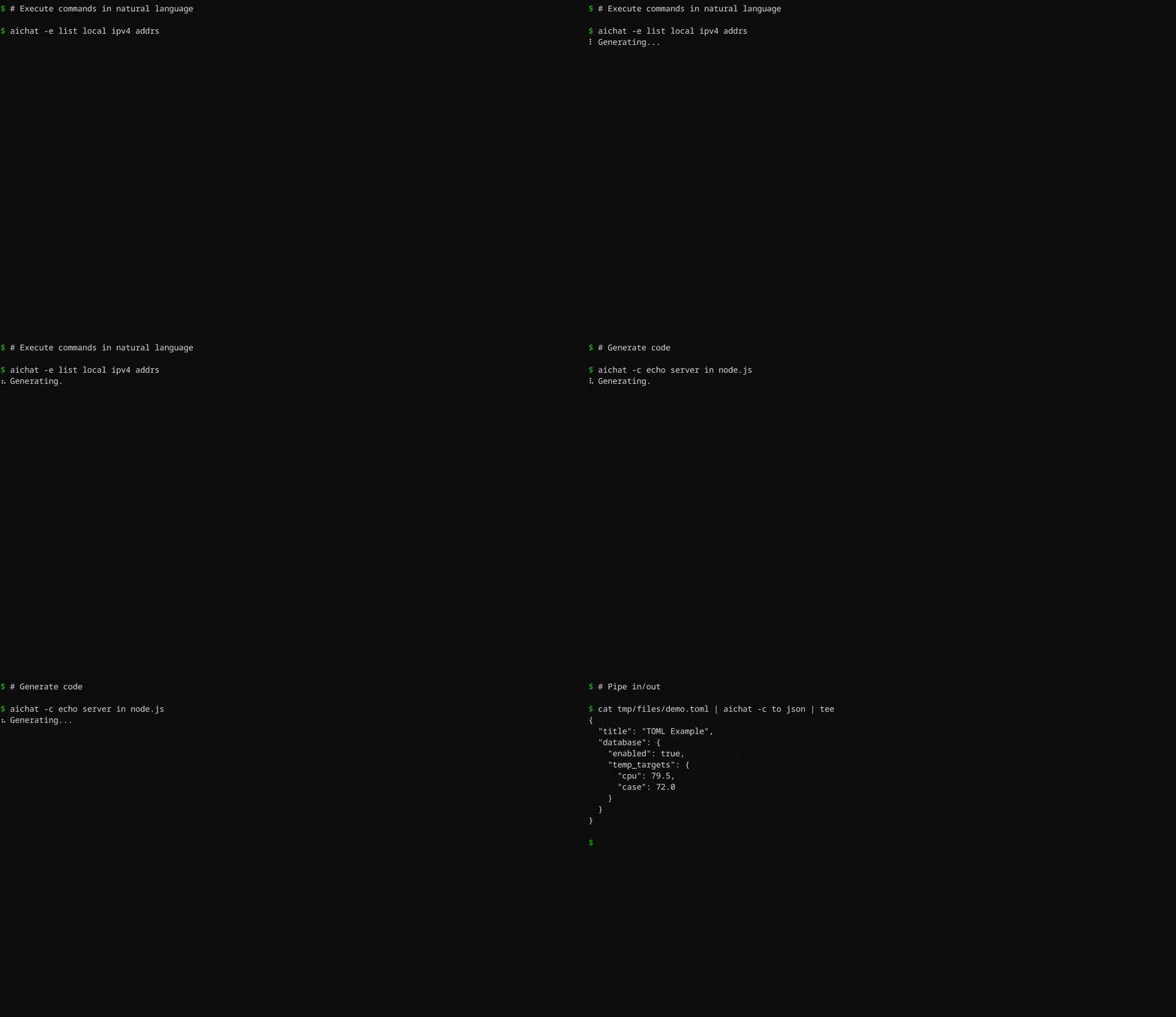 - -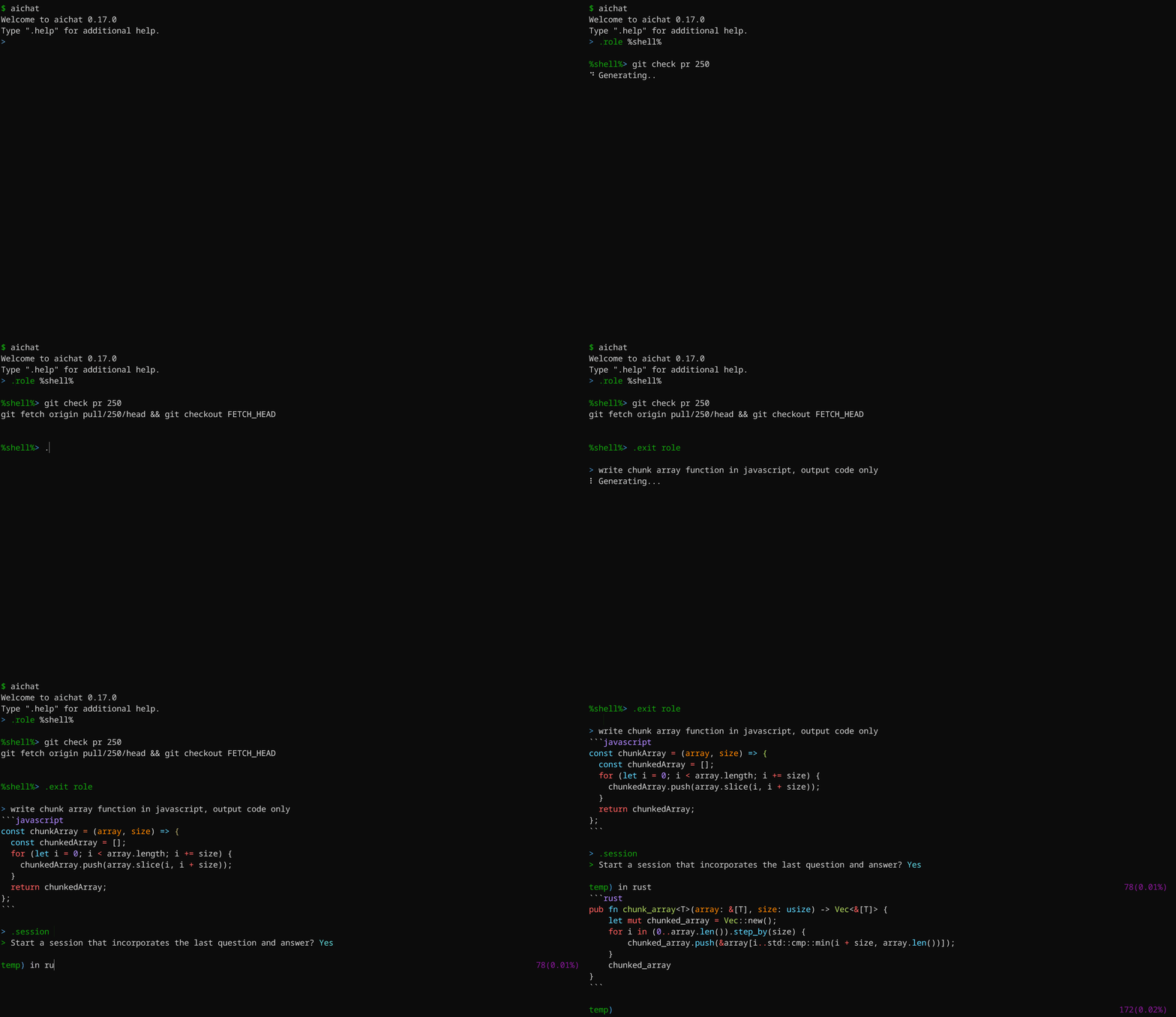 - -## Key Features - -- **Unified LLM Client**: Access 100+ LLMs across 20+ AI platforms effortlessly. -- **RAG Retrieval**: Get answer enhanced by your documents and knowledge bases. -- **Function Calling**: Connect LLMs to external tools seamlessly. -- **Execute Commands**: Use natural language to run shell commands. -- **Chat REPL**: Powerful and feature-rich interactive chat interface. -- **Useful Roles**: Tailor LLM behavior with customizable roles. -- **Unlimited Sessions**: Automatic message compression for endless conversations. -- **Shell Auto-Completion**: AI-based auto-completion for shell commands. -- **Highly Customizable**: Customize configurations and themes to your preferences. -- **Local API Server**: Host a local server with OpenAI-compatible API. -- **LLM Playground/Arena**: Experiment and compete LLMs in WebUI. - -## Supported LLMs - -- OpenAI: GPT-4/GPT-3.5 (paid, vision, embedding, function-calling) -- Gemini: Gemini-1.5/Gemini-1.0 (free, paid, vision, embedding, function-calling) -- Claude: Claude-3.5/Claude-3 (paid, vision, function-calling) -- Mistral (paid, embedding, function-calling) -- Cohere: Command-R/Command-R+ (paid, embedding, rerank, function-calling) -- Perplexity: Llama-3/Mixtral (paid) -- Groq: Llama-3/Mixtral/Gemma (free, function-calling) -- Ollama (free, local, embedding) -- Azure OpenAI (paid, vision, embedding, function-calling) -- VertexAI: Gemini-1.5/Gemini-1.0 (paid, vision, embedding, function-calling) -- VertexAI-Claude: Claude-3.5/Claude-3 (paid, vision) -- Bedrock: Llama-3/Claude-3.5/Claude-3/Mistral (paid, vision) -- Cloudflare (free, vision, embedding) -- Replicate (paid) -- Ernie (paid, embedding, rerank, function-calling) -- Qianwen: Qwen (paid, vision, embedding, function-calling) -- Moonshot (paid, function-calling) -- Deepseek (paid) -- ZhipuAI: GLM-4 (paid, vision, function-calling) -- LingYiWanWu: Yi-* (paid, vision) -- Other openAI-compatible platforms +AIChat is an all-in-one AI CLI tool featuring Chat-REPL, Shell Assistant, RAG, Tool Use, AI Agent, and More. ## Install @@ -62,324 +20,107 @@ AIChat is an all-in-one AI CLI tool featuring Chat-REPL, Shell Assistant, RAG, F Download pre-built binaries for macOS, Linux, and Windows from [GitHub Releases](https://github.com/sigoden/aichat/releases), extract them, and add the `aichat` binary to your `$PATH`. -## Configuration +## Get Started -Upon first launch, AIChat will guide you through the configuration process. +Upon its first launch after installation, AIChat will guide you through the initialization of the configuration file. -``` -> No config file, create a new one? Yes -> AI Platform: openai -> API Key: <your_api_key_here> -✨ Saved config file to '<user-config-dir>/aichat/config.yaml' -``` - -Feel free to adjust the configuration according to your needs. - -> 💡 Use the `AICHAT_CONFIG_DIR` environment variable to custom the config dir for aichat files. - -```yaml -model: openai:gpt-3.5-turbo # Specify the language model to use -temperature: null # Set default temperature parameter -top_p: null # Set default top-p parameter -save: true # Indicates whether to persist the message -save_session: null # Controls the persistence of the session, if null, asking the user -highlight: true # Controls syntax highlighting -light_theme: false # Activates a light color theme when true -wrap: no # Controls text wrapping (no, auto, <max-width>) -wrap_code: false # Enables or disables wrapping of code blocks -keybindings: emacs # Choose keybinding style (emacs, vi) -prelude: null # Set a default role or session to start with (role:<name>, session:<name>) - -# Command that will be used to edit the current line buffer with ctrl+o -# if unset fallback to $EDITOR and $VISUAL -buffer_editor: null - -# Compress session when token count reaches or exceeds this threshold (must be at least 1000) -compress_threshold: 4000 - -# Controls the function calling feature. For setup instructions, visit https://github.com/sigoden/llm-functions. -function_calling: false - -clients: - - type: openai - api_key: sk-xxx - - - type: openai-compatible - name: localai - api_base: http://127.0.0.1:8080/v1 - models: - - name: llama3 - max_input_tokens: 8192 - - ... -``` - -The [config.example.yaml](./config.example.yaml) file provides a comprehensive list of all configuration options with detailed explanations. -You'll find information on each option's meaning, default value, relevant documentation, and customization guidance. - -## Command-Line + -``` -Usage: aichat [OPTIONS] [TEXT]... - -Arguments: - [TEXT]... Input text - -Options: - -m, --model <MODEL> Select a LLM model - --prompt <PROMPT> Use the system prompt - -r, --role <ROLE> Select a role - -s, --session [<SESSION>] Start or join a session - --save-session Forces the session to be saved - --serve [<ADDRESS>] Serve the LLM API and WebAPP - -e, --execute Execute commands in natural language - -c, --code Output code only - -f, --file <FILE> Include files with the message - -H, --no-highlight Turn off syntax highlighting - -S, --no-stream Turn off stream mode - -w, --wrap <WRAP> Control text wrapping (no, auto, <max-width>) - --light-theme Use light theme - --dry-run Display the message without sending it - --info Display information - --list-models List all available chat models - --list-roles List all available roles - --list-sessions List all available sessions - -h, --help Print help - -V, --version Print version -``` - -Here are some practical examples: +You can tailor AIChat to your preferences by editing the configuration file. -```sh -aichat # Start REPL - -aichat -e install nvim # Execute -aichat -c fibonacci in js # Code +The [config.example.yaml](https://github.com/sigoden/aichat/blob/main/config.example.yaml) file provides a comprehensive list of all configuration options with detailed explanations. -aichat -s # REPL + New session -aichat -s session1 # REPL + New/Reuse 'session1' +## Features -aichat --info # View system info -aichat -r role1 --info # View role info -aichat -s session1 --info # View session info +### 20+ Platforms -cat data.toml | aichat -c to json > data.json # Pipe stdio/stdout +AIChat offers users a wide and diverse selection of Large Language Models (LLMs): -aichat -f data.toml -c to json > data.json # Send files +- **OpenAI:** GPT-4/GPT-3.5 (paid, vision, embedding, function-calling) +- **Gemini:** Gemini-1.5/Gemini-1.0 (free, paid, vision, embedding, function-calling) +- **Claude:** Claude-3.5/Claude-3 (paid, vision, function-calling) +- **Ollama:** (free, local, embedding) +- **Groq:** Llama-3/Mixtral/Gemma (free, function-calling) +- **Azure-OpenAI:** GPT-4/GPT-3.5 (paid, vision, embedding, function-calling) +- **VertexAI:** Gemini-1.5/Gemini-1.0 (paid, vision, embedding, function-calling) +- **VertexAI-Claude:** Claude-3.5/Claude-3 (paid, vision) +- **Bedrock:** Llama-3/Claude-3.5/Claude-3/Mistral (paid, vision) +- **Mistral** (paid, embedding, function-calling) +- **Cohere:** Command-R/Command-R+ (paid, embedding, rerank, function-calling) +- **Perplexity:** Llama-3/Mixtral (paid) +- **Cloudflare:** (free, vision, embedding) +- **OpenRouter:** (paid, vision, function-calling) +- **Replicate:** (paid) +- **Ernie:** (paid, embedding, rerank, function-calling) +- **Qianwen:** Qwen (paid, vision, embedding, function-calling) +- **Moonshot:** (paid, function-calling) +- **Deepseek:** (paid) +- **ZhipuAI:** GLM-4 (paid, vision, function-calling) +- **LingYiWanWu:** Yi-* (paid, vision) +- **OpenAI-Compatible Platforms** -aichat -f a.png -f b.png diff images # Send images -``` - -### Shell commands +### Shell Assistant Simply input what you want to do in natural language, and aichat will prompt and run the command that achieves your intent. -``` -aichat -e <text>... -``` - -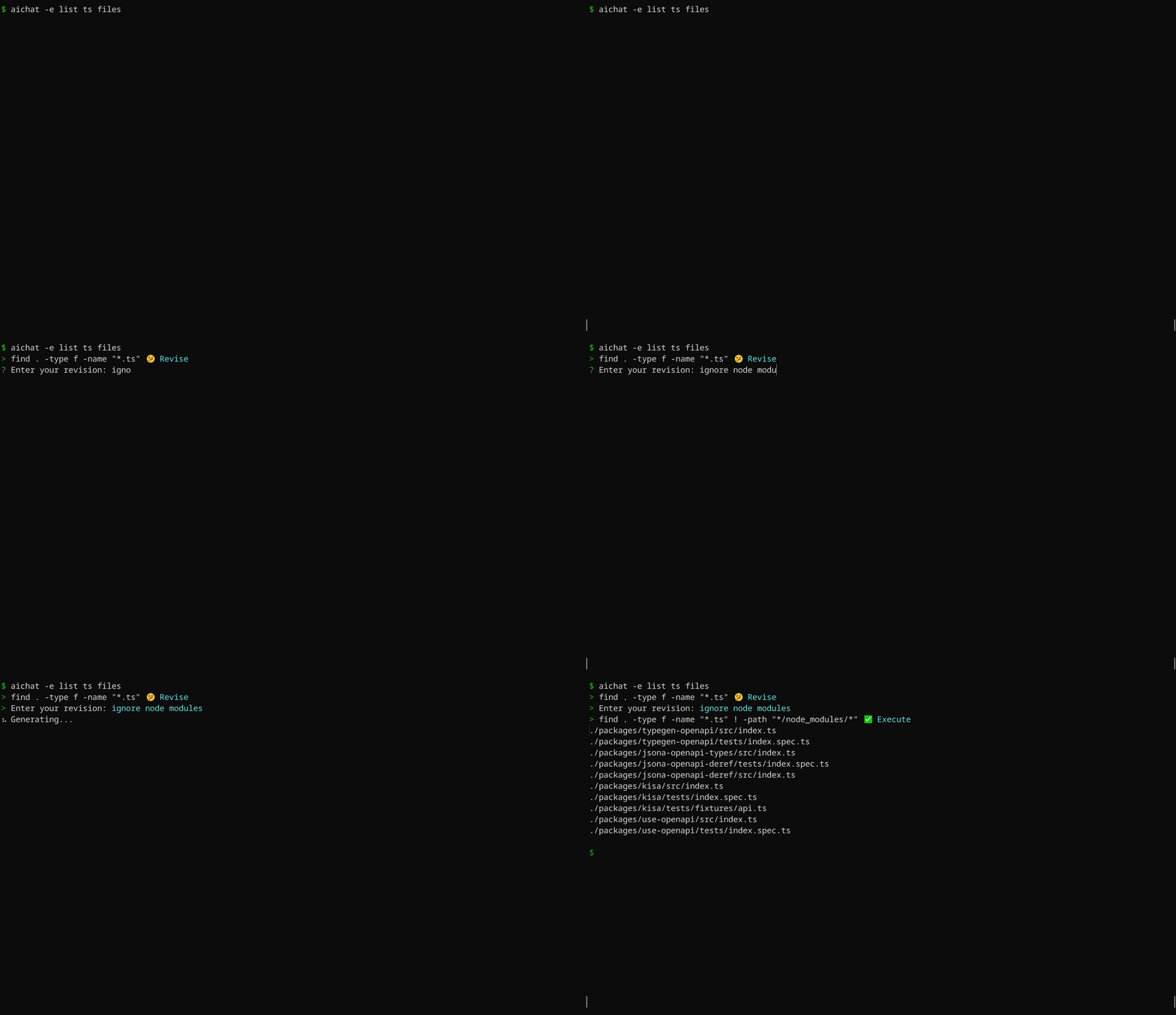 - -AIChat is aware of OS and shell you are using, it will provide shell command for specific system you have. For instance, if you ask `aichat` to update your system, it will return a command based on your OS. Here's an example using macOS: - -``` -$ aichat -e update my system -? sudo softwareupdate -i -a -``` - -The same prompt, when used on Ubuntu, will generate a different suggestion: -``` -$ aichat -e update my system -? sudo apt update && sudo apt upgrade -y -``` - -### Shell integration - -This is a **very handy feature**, which allows you to use `aichat` shell completions directly in your terminal, without the need to type `aichat` with prompt and arguments. This feature puts `aichat` completions directly into terminal buffer (input line), allowing for immediate editing of suggested commands. - -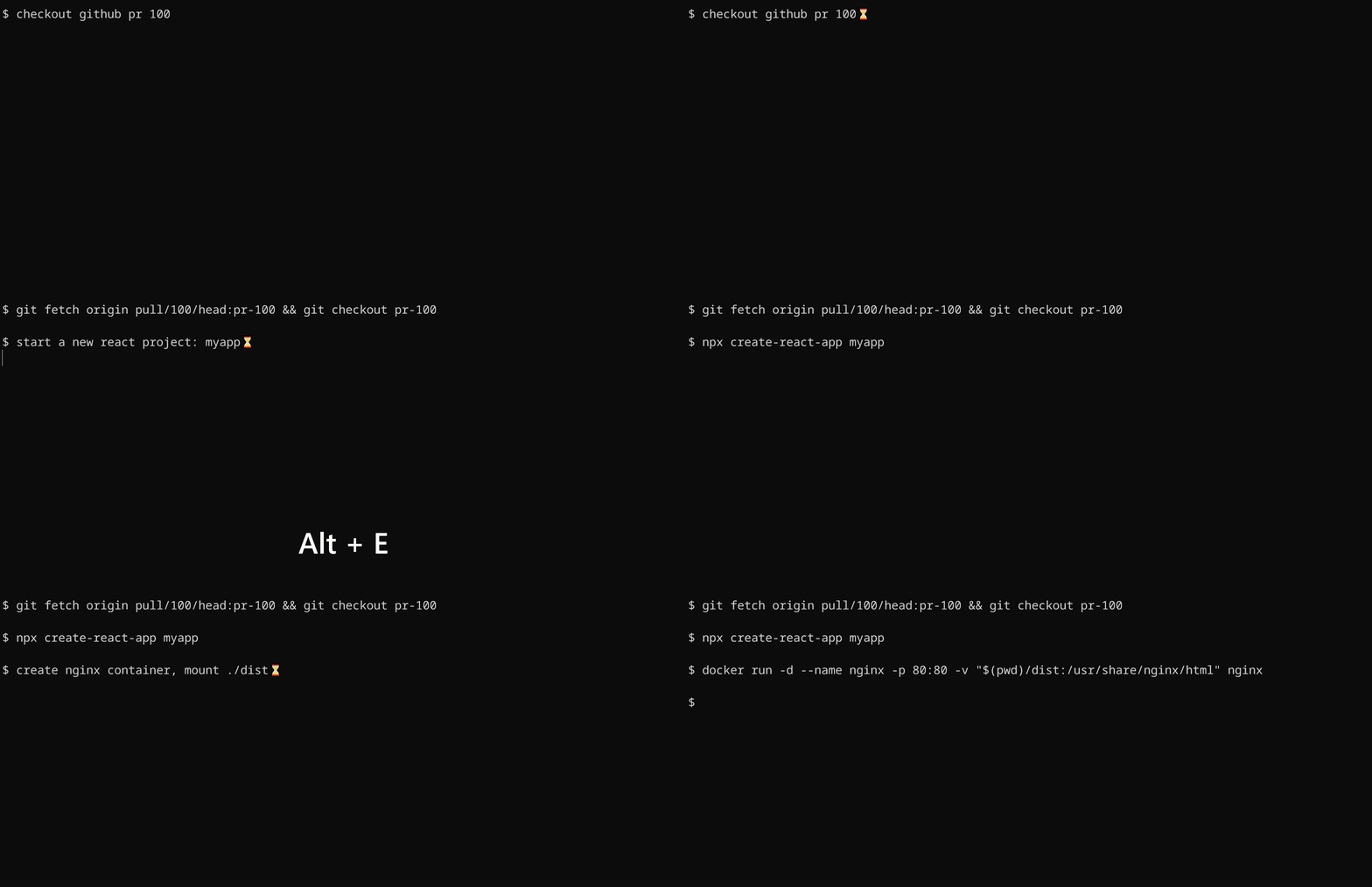 - -To install shell integration, go to [./scripts/shell-integration](https://github.com/sigoden/aichat/tree/main/scripts/shell-integration) to download the script and source the script in rc file. After that restart your shell. You can invoke the completion with `alt+e` hotkey. - -### Generating code - -By using the `--code` or `-c` parameter, you can specifically request pure code output. - - - -**The `-c/--code` option ensures the extraction of code from Markdown.** - -## Chat REPL - -AIChat has a powerful Chat REPL. - -REPL Features: - -- Tab auto-completion -- [Custom REPL Prompt](https://github.com/sigoden/aichat/wiki/Custom-REPL-Prompt) -- Emacs/VI keybinding -- Edit/paste multi-line text -- Open an editor to edit the current prompt -- History and Undo - -### `.help` - show help message - -``` -> .help -.help Show this help message -.info View system info -.model Change the current LLM -.prompt Create a temporary role using a prompt -.role Switch to a specific role -.info role View role info -.exit role Leave the role -.session Begin a chat session -.info session View session info -.save session Save the chat to file -.clear messages Erase messages in the current session -.exit session End the current session -.file Include files with the message -.set Adjust settings -.copy Copy the last response -.exit Exit the REPL - -Type ::: to start multi-line editing, type ::: to finish it. -Press Ctrl+O to open an editor to edit the input buffer. -Press Ctrl+C to cancel the response, Ctrl+D to exit the REPL -``` - -### `.info` - view information - -- `.info`: View system information -- `.info role`: view your current role information. -- `.info session`: view your current session information. - -### `.model` - change the current LLM - -``` -> .model openai:gpt-4 -> .model ollama:llama3 -``` - -> Tab autocompletion helps in quickly typing the model names. - -### `.role` - switch to a specific role - -Select a role: - -``` -> .role emoji -``` + -Send message with the role: +**AIChat is aware of OS and shell you are using, it will provide shell command for specific system you have.** -``` -emoji> hello -👋 -``` +### Role -Leave current role: +Customizable roles allow users to tailor the behavior of LLMs, enhancing productivity and ensuring the tool aligns with specific needs and workflows. -``` -emoji> .exit role + -> hello -Hello there! How can I assist you today? -``` +### Session -Temporarily use a role without switching to it: -``` -> .role emoji hello -👋 +By default, AIChat behaves in a one-off request/response manner. +With sessions, AIChat conducts context-aware conversations. -> -``` + -### `.session` - Begin a chat session +### Retrieval-Augmented Generation (RAG) -By default, aichat behaves in a one-off request/response manner. +Seamlessly integrates document interactions into your chat experience. -You should run aichat with `-s/--session` or use the `.session` command to start a session. + +### Function Calling -``` -> .session - -temp) 1 to 5, odd only 0 -1, 3, 5 - -temp) to 7 19(0.46%) -1, 3, 5, 7 - -temp) .exit session 42(1.03%) -? Save session? (y/N) - -``` - -### `.prompt` - create a temporary role using a prompt - -There are situations where setting a system message is necessary, but modifying the `roles.yaml` file is undesirable. -To address this, we leverage the `.prompt` to create a temporary role specifically for this purpose. - -``` -> .prompt your are a js console +Function calling supercharges LLMs by connecting them to external tools and data sources. This unlocks a world of possibilities, enabling LLMs to go beyond their core capabilities and tackle a wider range of tasks. -%%> Date.now() -1658333431437 -``` +We have created a new repository [https://github.com/sigoden/llm-functions](https://github.com/sigoden/llm-functions) to help you make the most of this feature. -### `.file` - read files and send them as input +#### Tool Use -``` -Usage: .file <file>... [-- text...] +Here's a glimpse of How to use the tools. -.file message.txt -.file config.yaml -- convert to toml -.file screentshot.png -- design a web app based on the image -.file https://ibb.co/a.png https://ibb.co/b.png -- what is the difference? -``` + -> The capability to process images through `.file` command depends on the current model’s vision support. +#### AI Agent -### `.rag` - chat with your documents and knowledge bases. +Agent = Prompt (Role) + Tools (Function Callings) + Knowndge (RAG). It's also known as OpenAI's GPTs. -``` -> .rag test1 -> Select embedding model: openai:text-embedding-3-small -> Set chunk size: 2000 -> Add document paths: tmp/files/paul_graham_essay.txt -✨ Saved rag to '<user-config-dir>/aichat/rags/test5.bin' - -#test1> What did the author do growing up? -The author mainly focused on writing and programming growing up ... -``` +The repository [https://github.com/sigoden/llm-functions](https://github.com/sigoden/llm-functions) provides utilities for developing agents and shares agents developed by the community. -### `.set` - adjust settings (non-persistent) +Here's a glimpse of how to use the agents. -``` -.set max_output_tokens 4096 -.set temperature 1.2 -.set top_p 0.8 -.set rag_top_k 4 -.set function_calling true -.set compress_threshold 1000 -.set dry_run true -``` + -## Local Server +### Local Server -AIChat comes with a built-in lightweight web server. +AIChat comes with a built-in lightweight http server. ``` $ aichat --serve Chat Completions API: http://127.0.0.1:8000/v1/chat/completions +Embeddings API: http://127.0.0.1:8000/v1/embeddings LLM Playground: http://127.0.0.1:8000/playground -LLM ARENA: http://127.0.0.1:8000/arena - -$ aichat --serve 0.0.0.0:8080 # to specify a different server address +LLM Arena: http://127.0.0.1:8000/arena?num=2 ``` -### OpenAI format API +#### Proxy LLM APIs AIChat offers the ability to function as a proxy server for all LLMs. This allows you to interact with different LLMs using the familiar OpenAI API format, simplifying the process of accessing and utilizing these LLMs. @@ -393,45 +134,32 @@ curl -X POST -H "Content-Type: application/json" -d '{ }' http://127.0.0.1:8000/v1/chat/completions ``` -### LLM Playground +#### LLM Playground The LLM Playground is a webapp that allows you to interact with any LLM supported by AIChat directly in your browser. - + -### LLM Arena +#### LLM Arena The LLM Arena is a web-based platform where you can compare different LLMs side-by-side. - - -## Function Calling + -Function calling supercharges LLMs by connecting them to external tools and data sources. This unlocks a world of possibilities, enabling LLMs to go beyond their core capabilities and tackle a wider range of tasks. +## Custom Themes -We have created a new repository [https://github.com/sigoden/llm-functions](https://github.com/sigoden/llm-functions) to help you make the most of this feature +AIChat supports custom dark and light themes, which highlight response text and code blocks. -Here's a glimpse of what function calling can do for you: + - - -## AI Agents - -Agent = Prompt (Role) + Tools (Function Callings) + Knowndge (RAG). It's also known as OpenAI's GPTs. - -The repository [https://github.com/sigoden/llm-functions](https://github.com/sigoden/llm-functions) provides utilities for developing agents and shares agents developed by the community. - -Here's a glimpse of what function calling can do for you: - - - - -## Wikis +## Wiki +- [Command-Line Guide](https://github.com/sigoden/aichat/wiki/Command-Line-Guide) +- [Chat-REPL Guide](https://github.com/sigoden/aichat/wiki/Chat-REPL-Guide) - [Role Guide](https://github.com/sigoden/aichat/wiki/Role-Guide) - [Environment Variables](https://github.com/sigoden/aichat/wiki/Environment-Variables) -- [Custom REPL Prompt](https://github.com/sigoden/aichat/wiki/Custom-REPL-Prompt) - [Custom Theme](https://github.com/sigoden/aichat/wiki/Custom-Theme) +- [Custom REPL Prompt](https://github.com/sigoden/aichat/wiki/Custom-REPL-Prompt) ## License @@ -439,4 +167,4 @@ Copyright (c) 2023-2024 aichat-developers. AIChat is made available under the terms of either the MIT License or the Apache License 2.0, at your option. -See the LICENSE-APACHE and LICENSE-MIT files for license details. +See the LICENSE-APACHE and LICENSE-MIT files for license details.
\ No newline at end of file |